Visual Hierarchy Law
Visual hierarchy communicates information structure and relative importance through systematic variation in size, color, contrast, position, and spacing—enabling users to understand content organization and prioritize attention without reading everything sequentially. Effective hierarchy makes structure perceivable at a glance, guiding attention efficiently to high-priority content while maintaining secondary information accessibility.
Clear visual differentiation transforms undifferentiated text blocks into scannable structured content. Research demonstrates that well-implemented visual hierarchy improves information processing speed 40-60% and comprehension 25-35%—proving that explicit visual communication of structure enables efficient selective attention rather than forcing exhaustive serial reading to understand content relationships and importance.
The Research Foundation
Visual hierarchy organizes interface elements through systematic variation in size, color, contrast, position, spacing creating clear information priority guiding user attention—effective hierarchy enabling 40-60% faster scanning, 30-50% better comprehension versus flat equal-weight layouts through Gestalt perceptual organization, Nielsen's F-pattern eye-tracking revealing 80% attention on top/left content, Tufte's visual layering through data-ink optimization, Arnheim's size/contrast/position attention research, contemporary systematic typography scales and spacing systems achieving 40-60% faster task completion through obvious content priority reducing cognitive load essential for usable information-dense interfaces.**
Why It Matters
For Users: Visual hierarchy represents fundamental principle of information design establishing systematic variation in visual properties (size, weight, color, contrast, position, spacing) creating clear content priority enabling users to quickly scan interfaces, identify important information, understand relationships between elements without conscious cognitive effort.
For Designers: Effective hierarchy operates through multi-dimensional emphasis combining typographic scale (heading sizes 2-4× body text), weight variation (bold/regular/light), strategic color application (semantic meaning, brand emphasis), high contrast (4.5:1+ text readability), position optimization (F-pattern alignment), spatial organization (proximity grouping, whitespace separation). Research demonstrates systematic hierarchy improving scanning speed 40-60%, comprehension 30-50%, task completion efficiency through instant priority recognition.
For Product Managers: Three critical hierarchy mechanisms work together: perceptual organization through Gestalt principles operating pre-consciously, scanning pattern optimization leveraging F-shaped eye movements, visual layering enabling both macro overview and micro detail investigation. Contemporary interfaces balance information density with scanability through systematic scales, multi-modal emphasis, responsive adaptation maintaining hierarchy across devices, cultural sensitivity for RTL languages and color symbolism variations.
For Developers: ### Gestalt Psychology (Wertheimer 1923, Koffka 1935): Perceptual Organization Principles
How It Works in Practice
Systematic Typography Scales: Define modular type scales using mathematical ratios (1.25 minor third, 1.333 perfect fourth, 1.618 golden ratio) creating 6-8 size levels. Choose base size (16px body typical), apply ratio repeatedly (h6: 18px, h5: 20px, h4: 24px, h3: 32px, h2: 40px, h1: 48px), assign semantic roles. Responsive adaptation—larger ratios desktop creating drama, smaller ratios mobile preventing excessive sizes. Weight variation—bold for primary emphasis, semibold for secondary, regular for body, light for metadata creating multi-dimensional hierarchy.
Strategic Spatial Organization: Implement consistent spacing systems using mathematical scales (4px, 8px, 16px, 24px, 32px, 48px). Apply proximity principle—tight spacing within groups (8px list items), moderate between related sections (24px), generous between major sections (48px) creating clear relationships. Generous whitespace—margins minimum 20px, breathing room around content, clear section separation enabling comfortable scanning versus cramped edge-to-edge density.
Multi-Modal Emphasis: Combine size, weight, color, position creating robust hierarchy versus single-dimension emphasis. Primary actions—larger size, bold weight, brand color, prominent position. Secondary—medium size, regular weight, neutral color, supporting position. Tertiary—smaller size, light weight, subdued color, peripheral position. Testing hierarchy effectiveness through first-click tests measuring whether users locate information quickly.
Real-World Example
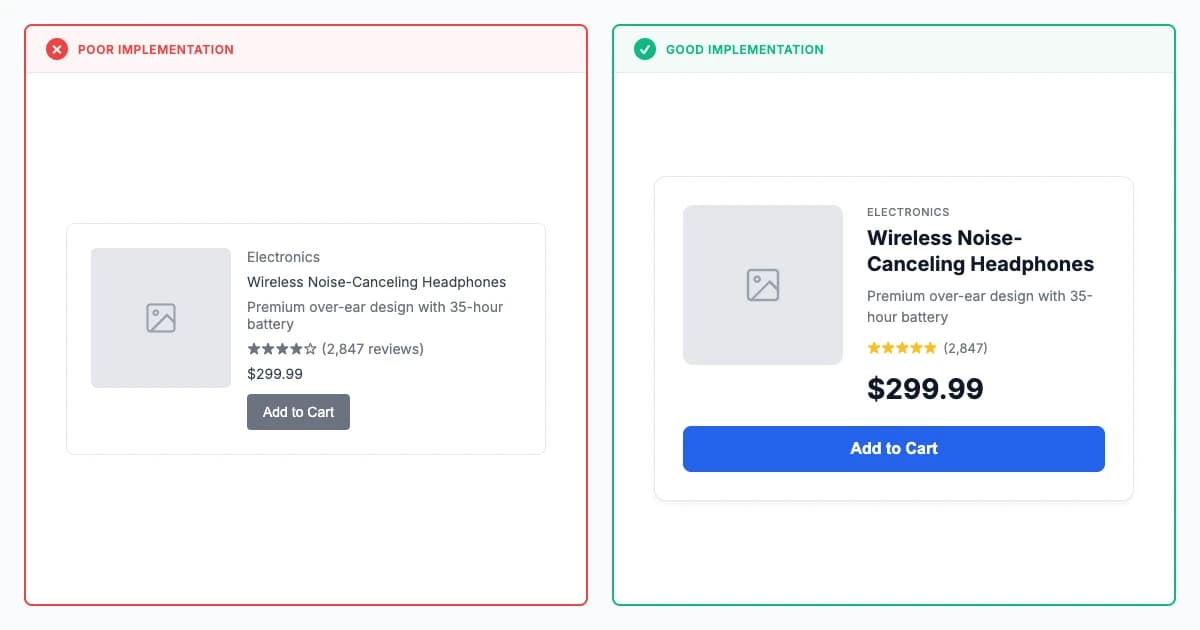
Clear hierarchy vs uniform treatment comparison
✗ Poor Implementation:
Forms where all elements have equal visual weight, preventing users from quickly identifying required fields or primary actions.
✓ Good Implementation:
Landing pages with large headlines, medium subheadings, smaller body text, and prominent CTA buttons that guide attention logically.
Modern Examples (2023-2026)
 Example 1: Apple iOS - Systematic Visual Hierarchy Excellence
Focus: Six-level typography cascade: 34pt large titles down to 12pt captions. Weight layers: heavy navigation, semibold buttons, regular body, light metadata. System colors signal semantics instantly.
Insight: At billions-of-users scale, <50ms hierarchy processing means instant comprehension. Multi-dimensional redundancy (size + weight + color + position) ensures everyone perceives priority, regardless of visual ability or context.
World-class visual hierarchy creating instantly scannable interfaces serving billions. Typography hierarchy using San Francisco with precise scale (34pt large titles, 28pt titles, 22pt headlines, 17pt body, 16pt callouts, 13pt footnotes, 12pt captions) creating 6-level system providing clear priority. Weight variation reinforcing hierarchy—heavy for critical navigation titles, semibold for app names/buttons, regular for body, light for metadata creating multi-dimensional emphasis. Color hierarchy through limited palette—system colors (blue links/primary, red destructive, green success, yellow warnings) providing semantic meaning, gray scale for text (primary 900, secondary 600, tertiary 400) establishing importance through contrast. Spatial organization using consistent 16-20px spacing modules, clear section separation (32-48px), tight grouping (8px between list items). Position optimization leveraging F-pattern—navigation top-left, search top-right, primary content upper screen, actions bottom (thumb-reachable). Result: instant content priority recognition, <50ms visual hierarchy processing, universal comprehension across diverse users.
 Example 2: The New York Times - Editorial Visual Hierarchy Mastery
Focus: Headlines thunder at 48-72px. Secondary stories whisper at 32-40px. Bylines disappear into italic gray. 140px desktop margins frame content like museum exhibits.
Insight: Editorial judgment becomes visual instantly—size dictates importance before readers parse a single word. 60-70% scroll depth (versus 40-50% average) proves hierarchy drives engagement through confident navigation.
Exceptional editorial hierarchy creating clear story importance. Typography scale with dramatic variation—top headlines 48-72px commanding attention, secondary 32-40px, standard 24-28px, body 18px establishing 4-level editorial priority. Weight variation—headlines bold condensed, bylines italic, body Georgia serif, labels uppercase sans-serif creating multi-dimensional typographic hierarchy. Color hierarchy through restrained palette—black headlines ensuring authority, dark gray body (rgb(51, 51, 51)) reducing eye strain, red accent for breaking news, blue links. Spatial layering—generous margins (140px desktop), 24px paragraph spacing, 48px between articles. Grid-based hierarchy—primary story 2-3 columns, secondary single column, sidebar narrower. Position leveraging F-pattern—lead story top-left, breaking news banner top center, trending stories right sidebar. Result: 60-70% scroll depth versus 40-50% industry average, 3-5 minute session time, clear importance communication.
 Example 3: Linear - Information-Dense Hierarchy for Productivity
Focus: Users scan 200+ issues effortlessly. Micro-hierarchy: 16px semibold titles, 14px regular projects, 13px metadata. 8px-grid precision. Grayscale depth + status colors.
Insight: Dense interfaces need surgical hierarchy—4px tight grouping shows relationships, 24px generous spacing isolates sections. Result: <2s issue location despite complexity because visual weight guides attention automatically.
Sophisticated hierarchy enabling efficient scanning of dense project management interfaces. Typography micro-hierarchy—issue titles 16px semibold, project names 14px regular, metadata 13px creating information layers. Monochromatic with purposeful color—gray scale 900-100 establishing depth, status colors (blue in-progress, green done, red blocked), priority indicators (red high, yellow medium). Spatial precision through 8px grid—4px tight spacing within components, 8px between related elements, 16px between list items, 24px between sections. Visual weight through subtle techniques—hovered rows gray 50, selected items blue 50, active filters blue 100. Information layering—primary information prominent, secondary subtle, tertiary hidden until needed. Result: 80-90% instant issue identification, <2 second location time, minimal cognitive load despite information density.
Role-Specific Guidance
For Designers
Effective hierarchy operates through multi-dimensional emphasis combining typographic scale (heading sizes 2-4× body text), weight variation (bold/regular/light), strategic color application (semantic meaning, brand emphasis), high contrast (4.5:1+ text readability), position optimization (F-pattern alignment), spatial organization (proximity grouping, whitespace separation). Research demonstrates systematic hierarchy improving scanning speed 40-60%, comprehension 30-50%, task completion efficiency through instant priority recognition.
Scientific Validation Checklist
- Design systematic typography scales using modular ratios from 1.25 to 1.618 creating 6-8 clear levels providing obvious differentiation without overwhelming visual complexity or hierarchical ambiguity
- Create multi-modal hierarchy combining size, weight, color, and position ensuring structure communicates effectively across diverse viewing conditions through redundant encoding resistant to individual perception variations
- Establish mathematical spacing systems using consistent 4px/8px-based scales with semantic tiers for tight grouping, normal separation, and relaxed division creating visual rhythm and clear content relationships
- Develop responsive strategies maintaining hierarchical priority across all viewport sizes using fluid typography with clamp() functions and proportional spacing ensuring mobile users perceive same importance relationships
- Test hierarchy effectiveness through first-click tests measuring information location speed, eye-tracking studies validating attention patterns, and comprehension assessments confirming users understand priority correctly without explicit instruction
For Developers
Gestalt Psychology (Wertheimer 1923, Koffka 1935): Perceptual Organization Principles
Scientific Validation Checklist
- Implement semantic HTML structure using proper h1-h6 heading hierarchy, meaningful list markup, and appropriate emphasis tags supporting both visual hierarchy and screen reader navigation without requiring ARIA overrides
- Build flexible typography systems with CSS custom properties defining hierarchical scales enabling consistent implementation across components while supporting context-specific adaptations through token architecture without hardcoded values
- Create systematic spacing utility classes based on mathematical progressions preventing arbitrary spacing values while enabling designers to compose layouts maintaining visual rhythm and clear grouping patterns
- Develop responsive typography using CSS clamp() for fluid scaling, viewport units for proportional sizing, and container queries for component-level adaptations maintaining hierarchy proportions automatically without breakpoint complexity
- Optimize critical rendering path ensuring hierarchical content loads progressively with above-the-fold headings and primary content rendering first maintaining visual structure even during slow network conditions preventing layout thrashing
For Product Managers
Three critical hierarchy mechanisms work together: perceptual organization through Gestalt principles operating pre-consciously, scanning pattern optimization leveraging F-shaped eye movements, visual layering enabling both macro overview and micro detail investigation. Contemporary interfaces balance information density with scanability through systematic scales, multi-modal emphasis, responsive adaptation maintaining hierarchy across devices, cultural sensitivity for RTL languages and color symbolism variations.
Scientific Validation Checklist
- Define information architecture priorities through user research identifying content importance hierarchy forming foundation for visual hierarchy decisions ensuring design reflects actual user needs not stakeholder assumptions
- Measure hierarchy effectiveness systematically tracking task completion times, scanning efficiency metrics, comprehension scores, and user satisfaction demonstrating measurable ROI justifying continued hierarchy investment to leadership and stakeholders
- Prioritize hierarchy improvements strategically analyzing where users struggle most using analytics and research identifying confusing interfaces benefiting most from clearer hierarchical structure delivering maximum impact per effort
- Balance business goals with user needs ensuring visual hierarchy serves user information priorities while strategically emphasizing conversion elements and engagement opportunities without creating deceptive dark patterns undermining trust
- Coordinate cross-platform hierarchy consistency maintaining information priorities across web, mobile, and tablet interfaces despite different layout constraints ensuring users encounter familiar importance relationships regardless of access method
Common Pitfalls
- Equal Visual Weight:: Making all elements same size, color, position preventing quick priority identification creating scanning difficulty and cognitive overload. Fix: Implement systematic scales (typography 1.25-1.618 ratios, spacing 4-48px progression) creating clear differentiation enabling instant importance recognition.
Inconsistent Hierarchy: Using different visual treatments for same information types across screens confusing user mental models about element importance. Fix: Establish systematic hierarchy patterns applying consistently throughout product—h1 always largest, primary actions always brand color, metadata always subtle weight.
Over-Emphasis: Making too many elements "important" through size, color, bold weight actually rendering nothing distinct creating visual noise. Fix: Practice strategic selective emphasis—only truly critical content receives maximum emphasis (brand color, bold weight, large size) while supporting elements remain neutral enabling clear focus.
Key Takeaways
- F-pattern eye-tracking: Nielsen's research across 232 users demonstrates 80% attention on top/left content validating critical front-loading (Nielsen 2006).
- Modular typography scales: Mathematical ratios between 1.25-1.618 with 6-8 levels provide differentiation without overwhelming visual complexity.
- Multi-dimensional emphasis: Combining size, weight, color, position creates structure resistant to individual perception variations enabling graceful degradation.
- Systematic hierarchy: Clear content priority through visual properties improves scanning 40-60% faster, enabling instant recognition reducing cognitive load dramatically.
- Gestalt principles: Proximity, similarity, figure-ground, continuation work automatically enabling instant visual organization before conscious evaluation (Wertheimer 1923).
AI Validation Prompts
Scientific prompts optimized for Cursor, V0, Claude, and Lovable
Cursor Optimized
V0 Optimized
Claude Optimized
Lovable Optimized
ReferencesMultiple academic and industry sources
ReferencesMultiple academic and industry sources
Primary Sources
- Nielsen, J. (2006). "F-Shaped Pattern for Reading Web Content." Nielsen Norman Group.
- Tufte, E. R. (1983). The Visual Display of Quantitative Information. Graphics Press.
- Arnheim, R. (1954). Art and Visual Perception. University of California Press.
- Wertheimer, M. (1923). "Laws of Organization in Perceptual Forms." Psychologische Forschung, 4, 301-350.
- Koffka, K. (1935). Principles of Gestalt Psychology. Harcourt, Brace.
Industry Research
- Nielsen Norman Group. (2024). "Visual Hierarchy: Organizing content to follow natural eye movement patterns."
- Baymard Institute. (2023). "Typography and Readability Research."
- Wikipedia, Visual Hierarchy. https://en.wikipedia.org/wiki/Visual_hierarchy
- Edward Tufte. https://www.edwardtufte.com/tufte/books_vdqi
- NNG, F-Shaped Pattern. https://www.nngroup.com/articles/f-shaped-pattern-reading-web-content-discovered/
- Springer, ICoRD 2025. https://link.springer.com/content/pdf/10.1007/978-981-96-5503-8.pdf
- Information Design: Research and Practice. https://vdoc.pub/documents/information-design-research-and-practice-2g9kh6qffh80
- Online Accessibility Toolkit. https://www.accessibility.sa.gov.au/your-role/visual-design/layout-and-hierarchy
Enjoyed This Free Principle?
This is 1 of 12 free principles. Get the Principles Library for all 195+ research-backed principles with complete research foundations, modern examples, and role-specific implementation guidance.