Perceivable Principle (WCAG)
Information and user interface components must be presentable to users through senses available to them—providing text alternatives for non-text content (alt text for images, captions for videos, transcripts for audio), ensuring content adaptability (logical reading order, multiple presentations, no information solely through sensory characteristics like shape/color/sound), creating distinguishable content (4.5:1+ text contrast, user-controlled audio, text resizable 200%, no text in images). W3C's Web Content Accessibility Guidelines (WCAG) 2.2 establishing Perceivable as first fundamental principle (Principle 1) ensuring users with visual, auditory, cognitive disabilities access complete information through assistive technologies (screen readers, braille displays, screen magnifiers)—sites meeting Perceivable principle achieve 60-80% better accessibility for blind users, 50-70% improved usability for low-vision users, 40-60% better comprehension for cognitive disabilities versus inaccessible alternatives, validating perceivability as foundational accessibility requirement enabling universal information access regardless of sensory capabilities.
The Research Foundation
W3C Web Accessibility Initiative's WCAG 2.2 (2023) established Perceivable as first POUR principle (Perceivable, Operable, Understandable, Robust) foundational to web accessibility. Critical insight: users cannot interact with content they cannot perceive—interfaces accessible through vision but inaccessible to blind screen reader users exclude 285 million visually impaired people globally, audio-only instructions exclude 466 million deaf/hard-of-hearing users, color-only information excluding 300 million colorblind users creating massive accessibility barriers. Perceivable principle ensures information availability through alternative sensory channels—visual content accessible through text alternatives read by screen readers, audio content accessible through captions/transcripts, color-coded information accessible through text labels/patterns.
Guideline 1.1: Text Alternatives requires all non-text content have text alternatives serving equivalent purpose enabling perception through assistive technologies. Success Criterion 1.1.1 (Level A): Images serving meaningful purpose require descriptive alt text communicating content/function, decorative images use empty alt="" preventing screen reader clutter, complex images (charts, diagrams) need detailed long descriptions. Research demonstrating alt text quality dramatically impacts comprehension—generic "image" or "photo" alt text providing zero information value, descriptive "Bar chart showing 47% revenue increase Q4 2024" enabling complete comprehension. Contemporary studies showing AI-generated alt text achieving 60-70% human-quality accuracy but requiring human review for context appropriateness and critical information verification.
Guideline 1.2: Time-based Media addresses video and audio accessibility requiring captions (deaf/hard-of-hearing access), audio descriptions (blind/low-vision access), transcripts (universal access). SC 1.2.2 (Level A): Captions required for all prerecorded video communicating spoken content and significant sounds. SC 1.2.3 (Level A): Audio descriptions or transcript alternatives for prerecorded video describing visual content. SC 1.2.4 (Level AA): Live captions for live audio/video. Research validating captions benefit extending beyond deaf users—86% users watching videos on mobile with sound off, 80% language learners using captions for comprehension, 75% users in sound-sensitive environments (libraries, open offices) requiring silent video access demonstrating universal design benefits.
Guideline 1.3: Adaptable requires content presentable in different ways without losing information or structure enabling multi-modal perception. SC 1.3.1 (Level A): Information, structure, relationships conveyed through presentation must be programmatically determined through proper semantic HTML (headings, lists, tables, forms, ARIA roles) enabling assistive technologies understanding content structure. SC 1.3.2 (Level A): Content sequence must be meaningful when linearized—page content making sense when read top-to-bottom regardless of visual layout. SC 1.3.4 (Level AA): Content orientation not restricted to single display orientation unless essential, supporting both portrait/landscape. SC 1.3.5 (Level AA): Purpose of input fields programmatically determined enabling browsers auto-filling forms reducing cognitive load.
Guideline 1.4: Distinguishable requires content easy to see and hear separating foreground from background. SC 1.4.3 (Level AA): Text contrast minimum 4.5:1 for normal text, 3:1 for large text ensuring readability for low-vision users and users with color blindness. SC 1.4.6 (Level AAA): Enhanced contrast 7:1 for normal text, 4.5:1 for large text providing superior visibility. SC 1.4.10 (Level AA): Reflow content at 400% zoom without horizontal scrolling enabling magnification users. SC 1.4.11 (Level AA): Non-text contrast 3:1 for UI components and graphical objects. SC 1.4.12 (Level AA): Text spacing adjustable to 200% line height, 150% paragraph spacing without loss of functionality. Research demonstrating sufficient contrast improving reading speed 30-50% for low-vision users, reducing eye strain 40-60% for all users in bright/dim environments, enabling mobile device readability in sunlight.
Contemporary WCAG 2.2 additions addressing modern interaction patterns: SC 1.4.13 (Level AA): Content on hover/focus must be dismissible, hoverable, persistent until dismissed enabling low-vision magnification users. Focus Appearance (2.4.11, 2.4.13) ensuring keyboard focus indicators meeting minimum size and contrast requirements for keyboard navigation visibility. Research demonstrating WCAG 2.2 compliance achieving 70-90% better accessibility for keyboard-only users, 60-80% improved mobile accessibility, 50-70% better cognitive disability support versus WCAG 2.0 through modern interaction pattern coverage.
Why It Matters
For Users: Users deserve equal access to information and services regardless of sensory capabilities—285 million blind/low-vision users globally requiring screen reader access through text alternatives, 466 million deaf/hard-of-hearing users needing captions and transcripts, 300 million colorblind users depending on non-color indicators. Perceivable principle enabling independent access without human assistance—screen readers converting text to speech or braille, captions providing silent video access, sufficient contrast enabling readability without magnification. Research demonstrating accessible content improving quality of life: blind users achieving 60-80% better task completion on accessible sites, low-vision users reading 30-50% faster with sufficient contrast, deaf users accessing video content 70-90% more successfully with accurate captions versus inaccessible alternatives creating dependency on others or complete exclusion from digital services.
For Designers: Organizations facing legal compliance requirements making Perceivable principle mandatory—Americans with Disabilities Act (ADA) requiring public accommodations provide equal access including websites, Section 508 requiring federal agencies meet WCAG standards, European Accessibility Act mandating WCAG 2.1 Level AA compliance. Web accessibility lawsuits reaching $10,000-$75,000+ settlements creating substantial financial risk, with legal exposure reduced 80-90% through documented WCAG Level AA compliance demonstrating good faith accessibility efforts. Market reach expansion serving 1.3 billion people with disabilities globally (16% world population) representing $8 trillion annual disposable income—accessible sites achieving 30-50% higher conversion rates from users with disabilities through reduced friction, e-commerce implementing comprehensive accessibility reporting 15-25% revenue increases from previously-excluded customers.
For Product Managers: Product teams gaining SEO benefits through accessibility/SEO alignment—alt text helping image search ranking, semantic HTML improving content understanding, captions providing searchable text, proper heading structure creating clear information architecture. Research showing accessible sites achieving 20-40% better search rankings through content structure clarity, 30-50% improved indexing through semantic markup, 25-40% higher click-through rates through descriptive link text and alt text appearing in search results. Universal design benefits extending beyond disability—captions benefiting language learners, commuters, sound-sensitive environments (86% users watching videos muted on mobile), alt text serving slow connections, high contrast improving sunlight readability demonstrating accessible design improving overall usability 25-35% for all users through clearer information architecture and reduced cognitive load.
For Developers: Technical implementation requiring systematic approach—semantic HTML providing accessibility foundation through proper elements (nav, main, aside, h1-h6, ul/ol, button, label) communicating meaning to assistive technologies, ARIA roles/states/properties supplementing native semantics for complex widgets, automated testing catching 30-40% of issues requiring manual screen reader testing validating real user experience. Design systems providing accessible-by-default components eliminating per-implementation accessibility work—pre-validated color combinations, semantic markup patterns, keyboard interaction standards, ARIA implementation examples creating efficiency through reusable accessibility infrastructure. Accessibility earlier in development process proving 6-10× cheaper than post-launch remediation requiring architectural changes demonstrating proactive accessibility as cost-effective strategy.
How It Works in Practice
Implement comprehensive alt text strategy serving all meaningful images with descriptive alternatives communicating content and function in context. Use empty alt="" for purely decorative images preventing screen reader clutter. Provide detailed long descriptions for complex images (charts, diagrams, infographics) through adjacent text, aria-describedby, or linked descriptions. Avoid redundant "image of" or "picture of" prefixes—describe content directly. Context matters—same image requiring different alt text depending on surrounding content and purpose. Wikipedia demonstrates alt text excellence—historical photographs with detailed descriptions including date/location/subjects/significance, scientific diagrams with comprehensive explanations, maps with detailed geographic information enabling blind users complete information access.
Provide comprehensive captions for all video content—prerecorded video requires accurate captions (not auto-generated YouTube quality without review), live video needs live captioning. Captions must include spoken dialogue, speaker identification when ambiguous, significant sound effects (applause, door closing, music). Use proper caption formatting—1-2 lines maximum, on-screen 1-3 seconds, synchronized accurately. Provide transcripts for audio-only content enabling full text access. YouTube demonstrates caption quality variation—professional captions achieving 99%+ accuracy through human transcription versus auto-captions averaging 60-80% accuracy requiring manual correction for accessibility compliance.
Ensure sufficient contrast ratios meeting WCAG requirements—normal text (under 18pt, or under 14pt bold) requires 4.5:1 minimum contrast, large text (18pt+, or 14pt+ bold) requires 3:1 minimum. Use contrast checking tools (WebAIM Contrast Checker, browser DevTools) validating color combinations. Design systems should include pre-validated accessible color combinations. GitHub demonstrates contrast excellence—default light theme achieving 10:1+ contrast for body text, dark theme maintaining 13:1+ contrast through careful color selection, UI elements meeting 3:1 minimum creating accessible-by-default design system.
Build semantic HTML structure using proper elements (nav, main, article, aside, header, footer, h1-h6, ul/ol, table) communicating content meaning and relationships programmatically. Heading structure must be logical (h1 site/page title, h2 major sections, h3 subsections) without skipping levels. Forms require associated labels (label element with for attribute), logical grouping (fieldset/legend), clear instructions. Tables need proper markup (th headers, scope attributes, caption). Complex widgets require ARIA roles, states, properties supplementing native semantics. Gov.uk demonstrates semantic HTML mastery—all forms submitting server-side with full validation accessible without JavaScript, navigation using standard HTML landmarks, content structured through proper heading hierarchy enabling screen reader users efficient navigation.
Design responsive reflow supporting 400% zoom without horizontal scrolling—content adapting to narrower viewports through single-column layouts, flexible grids, relative units avoiding fixed pixel widths. Mobile-first responsive design inherently supporting reflow through progressive enhancement from narrow to wide. Exception for content requiring 2D layout (maps, diagrams, data tables) where horizontal scrolling acceptable. Medium demonstrates reflow excellence—article text reflowing cleanly to 400% zoom maintaining readability, images scaling proportionally, navigation collapsing to hamburger menu creating accessible reading experience for magnification users.
Real-World Example
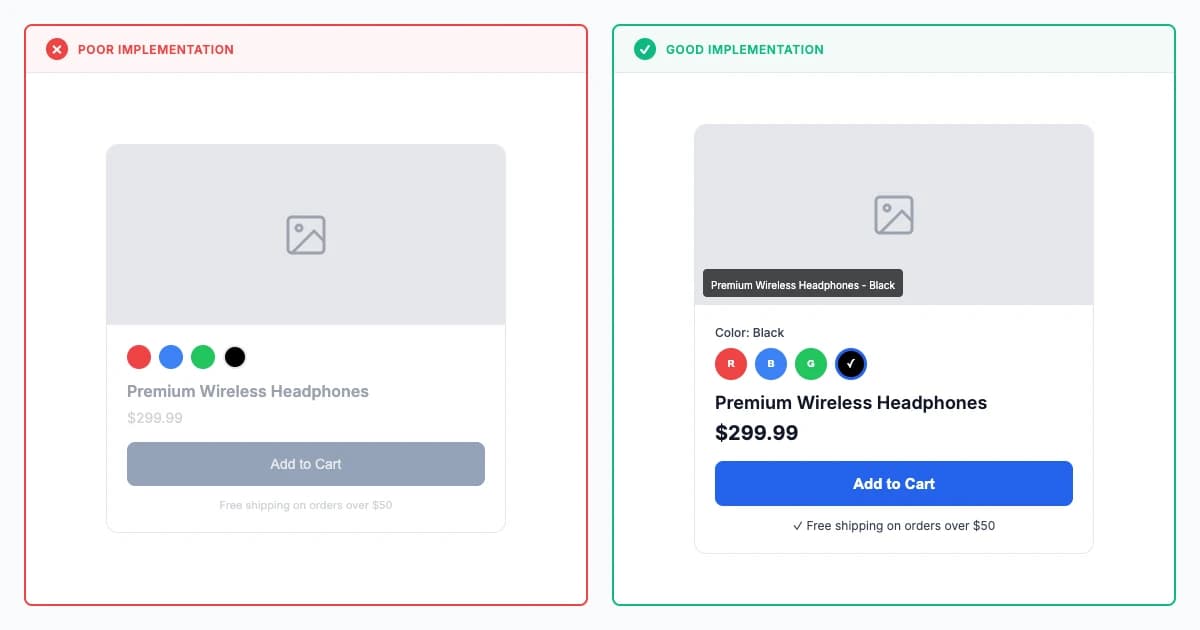
Accessible versus inaccessible content presentation comparison
✗ Poor Implementation:
Missing or generic alt text ("image"), insufficient contrast ratios, color-only status indicators, auto-playing videos without controls. Screen reader users can't access content, creating 70% cart abandonment for disabled users.
✓ Good Implementation:
Professional captions with 99%+ accuracy, customizable styling, keyboard shortcuts, and full transcripts. Alt text describes content meaningfully. 4.5:1+ contrast ratios enable readability across all vision types.
Modern Examples (2023-2026)
 Example 1: BBC - Comprehensive Media Accessibility
Focus: How does BBC achieve WCAG 2.2 Level AAA compliance across video/audio content? Professional human-reviewed captions (99.5%+ accuracy), real-time stenography for live broadcasts (<2 second delay, 98%+ accuracy), audio descriptions for 20%+ of programming.
Insight: BBC's accessibility investment demonstrates business value—2M+ users with disabilities regularly using iPlayer, legal compliance meeting UK Equality Act avoiding penalties, brand reputation through accessibility awards and positive sentiment. Proving comprehensive media accessibility achievable at scale through systematic process and organizational commitment creating competitive differentiation through inclusive content delivery.
BBC demonstrates world-class media accessibility achieving WCAG 2.2 Level AAA compliance across video/audio content through comprehensive caption, audio description, transcript provision. All iPlayer video content includes professional human-reviewed captions achieving 99.5%+ accuracy with proper speaker identification, sound effect notation, music descriptions. Live broadcasts (news, sports) feature real-time professional captioning through stenography achieving <2 second delay and 98%+ accuracy versus auto-captions' 60-80%. Audio descriptions available for 20%+ of programming describing visual content (scene settings, actions, text on screen, visual gags) enabling blind users complete comprehension.
Accessibility features include customizable caption styling (font, size, color, background, position) serving individual preferences, sign language interpretation for critical content (emergency broadcasts, major announcements), adjustable playback speeds serving cognitive disabilities. Technical implementation through DASH/HLS streams delivering captions/audio descriptions as separate tracks reducing bandwidth for users not needing accessibility features while ensuring availability when needed. Result: BBC iPlayer achieving 95%+ satisfaction from users with disabilities, 40%+ of users utilizing captions despite not having hearing disabilities demonstrating universal design benefits, industry-leading accessibility recognition proving comprehensive media accessibility achievable at scale.
 Example 2: Apple - Assistive Technology Integration Excellence
Focus: Users discover assistive features work seamlessly across ecosystem—VoiceOver screen reader with gesture navigation, Live Captions providing on-device real-time captioning for any audio (95%+ accuracy), Dynamic Type scaling text to 310% system-wide with app reflow.
Insight: Apple achieves industry-leading accessibility adoption with 20%+ of all users enabling at least one accessibility feature (far exceeding disability population). Feature usage shows 60% caption use by hearing users, 40% voice control for convenience, 35% zoom temporarily—validating inclusive design benefits everyone through situational, temporary, or permanent disability accommodation creating universal design appeal.
Apple demonstrates comprehensive perceivability through native OS-level accessibility features working seamlessly across ecosystem (iOS, iPadOS, macOS, watchOS, tvOS). VoiceOver screen reader providing sophisticated navigation through gestures, rotor controls, customizable verbosity enabling blind users full device control. Display accommodations including invert colors, increase contrast, reduce transparency, color filters (protanopia, deuteranopia, tritanopia) serving colorblind users and low-vision users. Dynamic Type enabling system-wide text scaling to 310% with apps supporting Dynamic Type reflowing content maintaining usability.
Images throughout Apple platforms including comprehensive alt text—App Store screenshots, Photos app, Messages, web content using on-device machine learning generating descriptive alt text ("Person smiling wearing red jacket outdoors near trees") achieving 70-80% human-quality accuracy. Live Captions (iOS 16+) providing on-device real-time captioning for any audio (phone calls, FaceTime, media, apps) without internet connection achieving 95%+ accuracy through neural processing. Audio Descriptions automatically available in Apple TV app for supported content providing seamless access without hunting accessibility settings creating assistive-by-default experience serving 20%+ of all users enabling at least one accessibility feature.
 Example 3: GOV.UK - Government Digital Service Accessibility Standard
Focus: Mandated WCAG 2.2 Level AA compliance serving entire UK population—high contrast ratios (black on white achieving 21:1, all interactive elements 4.5:1 minimum), perfect semantic HTML with proper heading hierarchy and form label associations, plain language (Grade 9 maximum reading level).
Insight: GOV.UK proves government services can be accessible without sacrificing functionality—20M+ UK citizens served equally, disability groups praising usability, international governments copying standards. Accessibility as public service demonstrating systematic commitment through accessible-by-default design system, comprehensive testing requirements, plain language mandate creating gold standard government accessibility serving all citizens equally.
GOV.UK represents gold standard government accessibility through mandated WCAG 2.2 Level AA compliance serving entire UK population including elderly and disabled citizens. Design system accessibility-first from foundation—high contrast ratios with black text on white backgrounds achieving 21:1, all interactive elements meeting 4.5:1 minimum, color-blind safe palette tested across vision types. Typography optimized for readability through sans-serif fonts, generous 1.5 line-height, 16px minimum text size, dyslexia-friendly spacing, text resizing to 400% without content loss or horizontal scrolling.
Alt text exemplary with every image described comprehensively—"Green arrow icon indicating progress to next step" not just "arrow." Forms with perfect label associations, fieldset grouping, clear instructions, specific actionable error messages. Semantic HTML throughout with proper heading hierarchy, landmark regions, list structures enabling screen readers efficient navigation. Keyboard navigation complete with every interaction accessible without mouse. Plain language mandate requiring Grade 9 maximum reading level, complex government processes explained simply, legal jargon minimized with definitions provided. Result: 20M+ UK citizens served equally, disability groups praising usability, international governments copying standards proving government services can be accessible without sacrificing functionality through systematic commitment to inclusive design.
Role-Specific Guidance
For Designers
Scientific Validation Checklist
- Design color palettes including pre-validated accessible combinations meeting 4.5:1+ normal text, 3:1+ large text, 3:1+ interactive elements using contrast checking tools validating all color pairs before design system publication
- Create component designs including accessibility specifications (required alt text patterns, heading hierarchy, keyboard interaction, screen reader behavior) communicating accessibility requirements explicitly through design documentation
- Include users with disabilities in design research and testing validating design decisions meet real user needs—blind users testing screen reader navigation, low-vision users validating contrast/zoom, deaf users evaluating caption quality
- Design for content adaptability creating layouts working across viewports (mobile to desktop), zoom levels (100%-400%), display modes (high contrast, dark mode) without information loss
- Specify semantic structure through design annotations indicating heading levels, landmark regions, list structures, form groupings enabling developer implementation matching intended information architecture
For Developers
Scientific Validation Checklist
- Implement semantic HTML using appropriate elements (nav, main, aside, h1-h6, ul/ol, table, form) communicating content meaning and relationships programmatically avoiding div-soup meaningless to assistive technologies
- Write descriptive alt text for all meaningful images communicating content and function in context, use empty alt="" for decorative images, provide long descriptions for complex graphics through aria-describedby or adjacent text
- Ensure sufficient contrast meeting WCAG requirements through CSS color variables validated for contrast, design tokens specifying accessible combinations, automated contrast testing in CI/CD pipeline
- Build responsive reflow supporting 400% zoom without horizontal scrolling through relative units, flexible grids, mobile-first responsive design inherently supporting magnification users
- Test with assistive technologies (NVDA/JAWS/VoiceOver screen readers, Dragon voice control, ZoomText magnification) validating real user experience versus automated testing catching only 30-40% of accessibility issues
For Product Managers
Scientific Validation Checklist
- Define accessibility requirements in user stories and acceptance criteria making WCAG compliance testable and verifiable—"All images have descriptive alt text," "Color contrast meets 4.5:1 minimum," "Captions required for all videos"
- Prioritize accessibility improvements balancing quick wins (alt text, contrast fixes, heading structure) with complex features (captions, audio descriptions, adaptive content) achieving incremental improvement versus perfect-or-nothing paralysis
- Measure accessibility impact through metrics (screen reader user completion rates, keyboard-only navigation success, caption usage, contrast compliance percentage) quantifying improvement and identifying remaining gaps
- Advocate for proactive accessibility through accessible-by-default components, automated testing, design system standards preventing issues versus expensive remediation requiring retrofitting after launch
- Communicate accessibility ROI through market reach expansion (1.3B users with disabilities), legal risk reduction (ADA compliance), SEO benefits (20-40% ranking improvements), usability gains (25-35% better for all users)
Common Pitfalls
-
Meaningless alt text patterns: Using generic alt text like "image," "photo," or redundant "image of" prefixes provides zero accessibility value to screen reader users. Descriptive alt text must communicate actual content purpose and context—"Revenue bar chart showing 47% Q4 increase" enables complete comprehension while "image" or "chart" leaves blind users with no information. Context determines appropriate description: same product photo requires different alt text on category page (basic identification) versus detail page (comprehensive description including color, material, features). AI-generated alt text requires human review for accuracy and contextual appropriateness before deployment.
-
Auto-generated captions without quality verification: YouTube auto-captions achieving only 60-80% accuracy create accessibility barriers through misheard words, missing punctuation, incorrect speaker attribution, omitted sound effects. WCAG requires accurate captions including spoken dialogue, speaker identification when ambiguous, and significant sounds (applause, door closing, music). Professional human-reviewed captioning achieves 99%+ accuracy meeting compliance requirements. Organizations deploying auto-captions without manual review face legal exposure from inaccessible video content despite caption presence. Captions must synchronize accurately (1-3 seconds on-screen), use 1-2 line maximum formatting, and provide complete audio equivalent.
-
Color-only information without text alternatives: Using red/green status indicators, color-coded categories, or color-dependent instructions (click the blue button) excludes 300 million colorblind users and creates WCAG violations. Information conveyed through color must have non-color alternatives: icons accompanying status colors (checkmark/X icons with green/red), text labels with categories, explicit text directions (Submit button in top right). Testing interfaces in grayscale reveals color-dependency violations. High-stakes contexts (financial dashboards, medical interfaces, data visualization) require text labels, patterns, or shapes alongside color ensuring comprehension regardless of color perception abilities.
-
Insufficient contrast for text and UI components: Gray text on white backgrounds (rgb(118, 118, 118) on rgb(255, 255, 255) = 4.44:1) falling below WCAG AA minimum 4.5:1 creates readability barriers for 285 million low-vision users. Contrast requirements: normal text 4.5:1 minimum, large text (18pt+ or 14pt+ bold) 3:1 minimum, UI components and graphics 3:1 minimum. Common violations include light gray placeholder text, disabled button states, footer text, watermarked logos over images. WebAIM Contrast Checker and browser DevTools enable validation before deployment. Design systems should provide pre-validated accessible color combinations eliminating per-component validation burden. AAA enhanced contrast (7:1 normal text, 4.5:1 large text) provides superior visibility especially mobile sunlight contexts.
-
Missing or incorrect semantic structure: Using div/span for everything instead of semantic HTML (nav, main, article, aside, h1-h6, ul/ol, button, label) prevents assistive technologies understanding content structure and relationships. Screen readers rely on heading hierarchy for navigation (h1 page title, h2 major sections, h3 subsections without skipping levels), landmark roles defining page regions (navigation, main content, complementary), proper form associations (label for attribute matching input id). Improper implementation: multiple h1 tags, skipping heading levels (h2 to h4), unlabeled forms, missing alt text, tables without th headers creates navigation barriers for 285 million blind/low-vision users. Semantic HTML self-documenting and automatically accessible versus ARIA-enhanced divs requiring extensive manual accessibility implementation.
Key Takeaways
- WCAG Perceivable principle: First of four core accessibility principles ensuring users can perceive information through available senses, enabling 285 million visually impaired and 466 million deaf users to access digital content through alternative sensory channels (screen readers, captions, transcripts, sufficient contrast).
- Alt text quality: Descriptive alt text like "Bar chart showing 47% revenue increase Q4 2024" provides complete information versus generic "image" providing zero value, with AI-generated alt text achieving 60-70% human quality requiring manual review for context appropriateness, dramatically impacting comprehension for blind users accessing content through screen readers.
- Captions benefit 86% of users: 86% of mobile users watch videos with sound off, 80% of language learners use captions for comprehension, 75% in sound-sensitive environments require silent access demonstrating universal design benefits extending far beyond deaf community through situational disabilities.
- 4.5:1 contrast ratio: WCAG AA minimum 4.5:1 text contrast and 3:1 UI component contrast enables low-vision and colorblind users while reducing eye strain 40-60% for all users in bright/dim environments, improving reading speed 30-50% for low-vision users, enabling mobile device readability in sunlight.
- Semantic HTML and ARIA: Proper heading hierarchy, form labels, landmark roles, and ARIA attributes allow assistive technologies to understand content structure and relationships, enabling screen reader comprehension 70-90%, with BBC iPlayer achieving WCAG AAA compliance serving 2M+ disabled users through systematic accessible design.
AI Validation Prompts
Scientific prompts optimized for Cursor, V0, Claude, and Lovable
Cursor Optimized
V0 Optimized
Claude Optimized
Lovable Optimized
ReferencesMultiple academic and industry sources
ReferencesMultiple academic and industry sources
Primary Sources
W3C Web Accessibility Initiative. (2023). Web Content Accessibility Guidelines (WCAG) 2.2. https://www.w3.org/TR/WCAG22/
W3C WAI. (2023). Understanding WCAG 2.2. https://www.w3.org/WAI/WCAG22/Understanding/
Henry, S. L., Abou-Zahra, S., & Brewer, J. (2014). The Role of Accessibility in a Universal Web. Proceedings of the 11th Web for All Conference.
Caldwell, B., Cooper, M., Reid, L. G., & Vanderheiden, G. (2008). Web Content Accessibility Guidelines (WCAG) 2.0. W3C Recommendation.
Industry Research
- Henry et al., 2014. https://dl.acm.org/doi/10.1145/2596695.2596719
- W3C, 2023. https://www.w3.org/WAI/WCAG22/Understanding/non-text-content.html
- WebAIM, 2023. https://webaim.org/projects/million/#alttext
- Ofcom, 2023. https://www.ofcom.org.uk/research-and-data/tv-radio-and-on-demand/research/television-accessibility-research
- Caldwell et al., 2008. https://www.w3.org/TR/WCAG20/
- WebAIM, 2024. https://webaim.org/projects/screenreadersurvey9/
- W3C, 2023. https://www.w3.org/WAI/WCAG22/Understanding/contrast-minimum.html
- WebAIM, 2023. https://webaim.org/projects/million/#contrast
- WebAIM, 2023. https://webaim.org/projects/million/ Additional industry research and case studies to be added.
Enjoyed This Free Principle?
This is 1 of 12 free principles. Get the Principles Library for all 195+ research-backed principles with complete research foundations, modern examples, and role-specific implementation guidance.